
Home › Quetta WASA Bill
Q-WASA Quetta
WASA Quetta Bill Online Check
Quetta’s water authority is the Quetta Water and Sanitation Authority — Q-WASA. Its website links to an online billing portal under ‘Find my bill’, where you can look up your bill with your consumer details from an old bill.
Search Your WASA Bill Online
Free. No sign-up — it takes about a minute.
اپنا شہر منتخب کریں، پرانے بل پر لکھا اکاؤنٹ یا کنزیومر نمبر درج کریں اور "چیک بل" دبائیں۔ پانچ سیکنڈ میں آپ کا اصل بل سرکاری ویب سائٹ پر کھل جائے گا۔

Q-WASA does not publish its fees on its website, so this page will not guess them. For a bill amount, always rely on the bill the official portal shows you.
Where to find your consumer number
Keep an old Q-WASA bill or your consumer number ready — the billing portal asks for your consumer details. If you have lost both, contact Q-WASA on 081-9211609.
How to Check Your Quetta WASA Bill Online
It takes about a minute, and it works at any hour of the day. Follow these steps:
- Keep your consumer number ready — it is printed on any old Q-WASA Quetta bill.
- Enter the number in the checker above and click Check Water Bill.
- Wait 5 seconds. You are redirected to the official Q-WASA Quetta website (Q-WASA online bill generator) — if the portal asks for the number, enter the same number there.
- Your latest bill appears on the screen. Check the name, address, amount and due date.
- Save or print the duplicate bill if you need a copy — press Print and choose ‘Save as PDF’ for a file.
- Pay it before the due date to avoid the surcharge (ways to pay are listed below).
Download and print your Quetta duplicate bill
The bill on your screen is a full duplicate of the paper original — same consumer number, same amount, same due date. It is accepted everywhere the original is: at bank counters, in mobile wallets and for your own records. Use the Print option on the bill and choose “Save as PDF” if you want a file to keep or to send to a tenant. If the paper bill never arrived at your house, this duplicate is the copy to pay against; there is no need to visit the Q-WASA Quetta office for it.
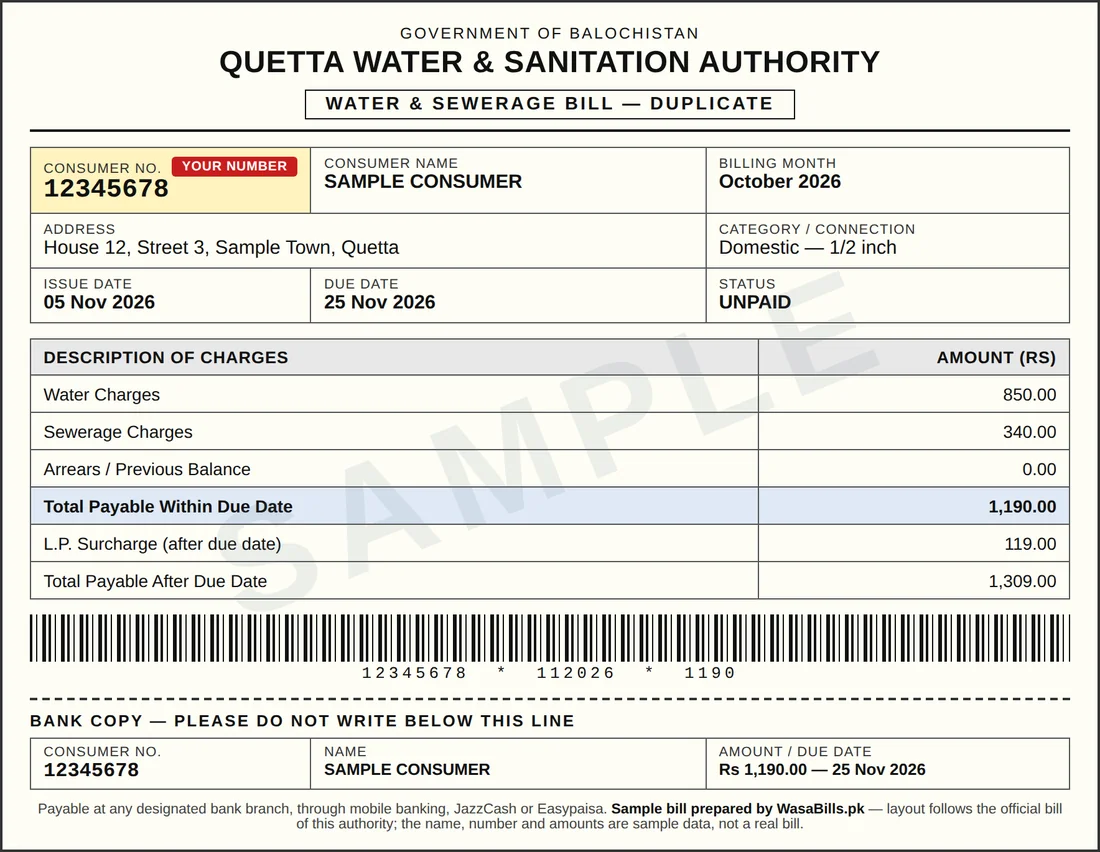
What your Quetta bill looks like
This is the layout of the bill Q-WASA Quetta issues — the same design appears on the printed bill and on the duplicate you open from the checker. The name, number and amounts in this picture are sample data. Your own consumer number sits in the highlighted box, exactly where it is on your real bill.
About Q-WASA Quetta
Quetta’s water is run by Q-WASA, the city’s own agency since the 1980s, responsible for Quetta District; its office is on New Zarghoon Road. For a new connection it asks for an attested CNIC copy, the sale deed, an Excise & Taxation assessment and a site plan. Q-WASA publishes its complaint number but no current fee table — one more reason to confirm every charge at the office before you pay it.
Why is my Quetta bill high this month?
Before anything else, look for arrears on the bill — an unpaid balance from an earlier month is the most common reason a Quetta bill suddenly looks big. After that, check your home: a leaking tank valve, a running flush or a cracked underground pipe wastes water around the clock. A wrong reading can also slip in. On unmetered connections the charge is fixed, so the bill does not fall in a month when you used less. If none of these explains it, ask Q-WASA Quetta to check the bill before you pay the extra — call 081-9211609 or follow the routes on our complaint page. A real mistake can be corrected. For the full checklist, read our guide on why a WASA bill comes out high.
Billing month, due date and surcharge in Quetta
Q-WASA Quetta bills are monthly, and every bill names the month it belongs to. The paper copy reaches different streets on different days, but that does not change anything that matters: the date printed on the bill as the due date is the last day to pay at the lower amount. From the next day, the higher “payable after due date” figure applies, because the late surcharge has been added. If a month’s bill never reached your house, check it online in the first week of the month instead of waiting — a late paper bill is not accepted as a reason by any billing office. And if you miss a month completely, the unpaid amount does not disappear. It returns on the next bill as arrears, which is why one missed month makes the following bill look so heavy. Our due date and surcharge guide explains the two amounts printed on every bill, and how to stay on the lower one.
New WASA water connection in Quetta
A new connection starts at the Q-WASA Quetta office (Q-WASA head office, Quetta), not online. Take your CNIC and your property documents — registry or allotment papers, or a rent agreement if you are a tenant applying with the owner’s permission. The office issues a demand note with the current connection charges; we do not print a fee figure here because the authorities revise these charges and an old figure would mislead you. Once the connection is installed, your first bill carries the consumer number that you will use for every online check from then on.
Direct link: the official Q-WASA Quetta online system is at qwasa.gob.pk — new-connection requirements, any application form and office contacts are published there, so check it before you visit. If an online application route is offered for your area, it will be on that system, and the office counter remains the fallback for everyone. Our guide to a new WASA water connection walks through the full process.
How to pay the Quetta bill
Pay the bill shown on the official portal through your bank or as directed on the bill, and keep the receipt.
| Way to pay | How it works | Good to know |
|---|---|---|
| Bank mobile app | Bill payment → water / WASA → choose your city authority → enter the number on your bill → confirm and pay | Works with all major Pakistani banks; keep the transaction ID |
| Easypaisa / JazzCash | Utility bill payment → select the water authority for your city → enter consumer / reference number → pay | Karachi KWSC bills can also be paid by JazzCash from the KWSC bill page itself |
| 1Bill (bank apps & ATMs) | Where the bill shows a 1Bill reference (e.g. Lahore), pay it from any 1Bill channel | The reference is printed on the bill itself |
| Bank counter | Print the duplicate bill and pay cash at any authorised bank branch | Keep the stamped copy as proof |
| NADRA e-Sahulat / retail shops | Take your bill or its number to an e-Sahulat or authorised retail agent | A small service fee may apply at some agents |
Areas served in Quetta
Satellite Town, Jinnah Town, Cantt, Sariab Road and Q-WASA-served city areas.
Quetta helpline and office
| Authority | Q-WASA Quetta |
|---|---|
| Helpline | 081-9211609 |
| Office | Q-WASA head office, Quetta |
| Official portal | Q-WASA online bill generator |
| Official website | qwasa.gob.pk |
Quetta WASA bill — questions
How do I check my Quetta WASA bill online?
Enter your consumer number in the checker on this page and press Check Bill. Your bill opens on the official Q-WASA Quetta portal with the amount, due date and arrears.
Where do I find my Quetta consumer / account number?
Keep an old Q-WASA bill or your consumer number ready — the billing portal asks for your consumer details. If you have lost both, contact Q-WASA on 081-9211609.
Can I download a duplicate Quetta bill?
Yes. Once your bill opens on the official portal, print it or save it as PDF. The duplicate is a full copy of the original and is accepted for payment at banks and through mobile wallets.
How do I pay my Quetta water bill online?
Pay the bill shown on the official portal through your bank or as directed on the bill, and keep the receipt. Always confirm the amount on the bill matches before you pay, and keep the transaction ID or stamped copy.
My Quetta bill is wrong or too high. What do I do?
Check the bill for arrears and surcharge first, and check your home for leaks. If it still looks wrong, contact Q-WASA Quetta — helpline 081-9211609 — or follow the routes on our WASA bill complaint page.
Common Quetta problems, quick answers
No water, or weak supply
Call Q-WASA Quetta on 081-9211609 and note the complaint number you are given. Supply runs to a schedule by area, so ask for your street’s timing while you have them on the line.
The bill looks wrong
Check the arrears line first — most sudden jumps are an old balance, not this month’s water. Still wrong? Use the complaint routes and take your last bills and receipts.
New connection or name change
Both start at the office (Q-WASA head office, Quetta). Take your CNIC and property papers; the office issues a demand note showing the current charges before any work begins.
Ways to pay in Quetta
Bank app or internet banking
Pay through 1-Link in almost any Pakistani bank app. For Lahore, type the prefix 100059 before your 8-digit account number.
Scan the QR code
Lahore bills carry a printed QR code. Scan it in the Bank Alfalah, Standard Chartered or HBL app and the amount fills itself in — no typing, no wrong number.
JazzCash or Easypaisa
Open the wallet, choose bill payment and the water category, pick your city authority, and pay against the same consumer number you checked with.
Bank counter or NADRA
Prefer cash? Any bank branch and NADRA e-Sahulat take WASA bills. Remember: NADRA takes the full amount only, never a part payment.
Before you visit the Q-WASA Quetta office
Some work still happens at a counter — a new connection, a name change, a correction in the record. A prepared visit is a short one:
- Carry your CNIC and a photocopy, plus your latest bill, paid or unpaid.
- For anything about ownership — name change, new connection, a record correction — take the property papers too: registry, allotment letter, or the rent agreement if you are a tenant applying with the owner’s consent.
- Go in the morning. Counters are quieter early, and the day’s token list fills up by midday.
- Whatever you submit, ask for the diary or token number and keep the stamped copy. It is your proof, and it turns every follow-up visit into a short one.
- Before you pay any demand note, read it line by line and ask what each charge is for. The current charges are the ones printed on that note — not a figure from a website or a neighbour’s old bill.
Keeping your Quetta bill under control
On an unmetered connection the monthly charge is fixed by plot size, so careful water use does not shrink that bill directly. What discipline does stop is the two things that genuinely push bills up: charges that grow around a working meter where one exists, and the arrears spiral that starts the first time a bill is skipped. The habits that matter:
- Fix the roof tank’s ball valve. An overflowing tank is the most common silent waste in Pakistani homes — and the first thing to rule out when a metered bill climbs.
- Listen at night. If the tank keeps refilling while every tap is closed, water is escaping somewhere. Find it this month, not after the next bill.
- Pay when the bill arrives, not on the last day. Queues, app failures and portal rush all cluster at the deadline, and the surcharge does not care whose fault the delay was.
- Keep every paid bill and payment screenshot for a year. Records settle almost every dispute at the counter in minutes.
More help with your Quetta bill
- WASA duplicate bill — get a copy when the paper bill is lost
- Pay your WASA bill online — bank apps, wallets, QR and counters
- WASA bill complaints — routes for a wrong or high bill
- WASA bill by SMS — bill alerts on your phone
- Why is my WASA bill so high? — the usual causes, checked one by one
- WASA supply timings — when water comes in Lahore, including Ramadan hours